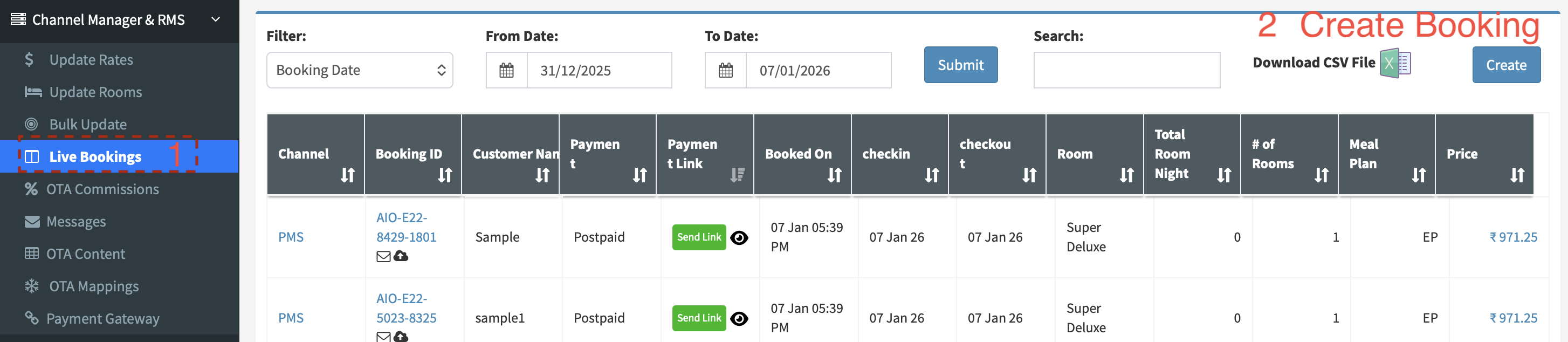
Create a booking from Channel Manager
- Navigate to Live Bookings
- Click on Create to Add a Reservation
Related Articles
How to create booking from Channel Manager - Aiosell Channel Manager
How to create direct and walk-in bookings from Aiosell Channel Manager: 1.Go to channel manager - LIVE BOOKINGS 2.On the right top you will have a CREATE option 3.There you can input all the booking details & guest details, once done click on Submit ...
Channel Manager Support Videos
Rate & Inventory Updates How to Update Rates - https://support.aiosell.com/portal/en/kb/articles/how-to-update-rates-aiosell-channel-manager How to Update Inventory - ...
How to send Booking Vouchers - Aiosell Channel Manager
<br> How to send booking voucher from Aiosell Channel Manager: 1.Go to Channel Manager - LIVE BOOKINGS 2.Here you will see the envelope option, click on this option 3.You will have an email Id auto-filled, if not enter the email ...
Aiosell REST API Documentation - OTA/Booking Engine to Channel Manager
This guide is designed for Online Travel Agents / Booking Engine looking to integrate with Aiosell Channel Manager. It outlines the required API endpoints, data formats, and workflows for receiving inventory, rates, and posting reservations. ...
How to Push Booking from CM to PMS - Aiosell Channel Manager
<br> How to push the booking from Aiosell Channel Manager to PMS: 1.If you cannot find any specific booking in PMS that you have received on channel manager, 2.Go to channel manager -- Go to LIVE BOOKINGS 3.Find that booking, ...