How to Enable Aiosell as a Channel Manager on Booking.com
2.
Login to your account using the username & password

3.
Once you login to your property account, there are options on the top right
corner -- go to that circled icon
4.
Click on that icon you will get a drop down – select CONNECTIVITY
PROVIDER

5.
You will be directed to Connectivity Provider page – Click on SEARCH
button

6.
You will be directed to Search for a Provider --- type “AIOSELL” in
the box
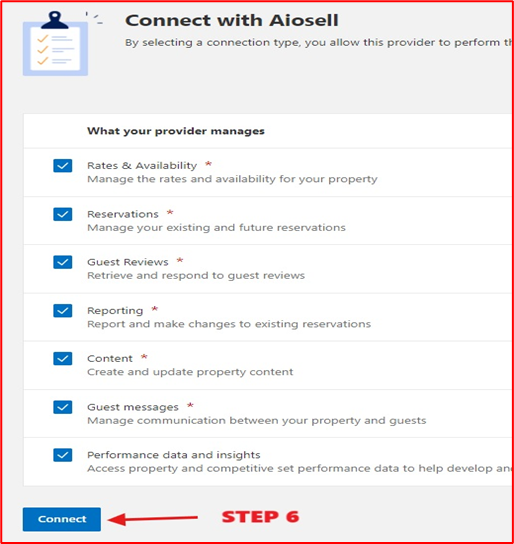
7.
You will be directed to Connect with Aiosell page – click on CONNECT at
the bottom
8. Once done, please share the Booking.com Hotel ID and let us know which Booking.com room should be mapped to which room type in Aiosell.
Example -
Suite Deluxe in Aiosell = Double Deluxe Room in Booking.com
Standard Twin Bed in Aiosell = Standard Twin in Booking.com
9. Also make sure the Room categories, Occupancy & Rate plans are similar to Aiosell Configuration. If there are any extra Rate Plans such as NON REFUNDABLE, LONGSTAY etc please delete them if created by default during Listing.
Related Articles
Aiosell Channel Manager Integration Guide
How to Enable Aiosell as Channel Manager in OTAs: Expedia: https://support.aiosell.com/portal/en/kb/articles/how-to-enable-aiosell-as-a-channel-manager-on-expedia Booking com: ...
How to Enable Aiosell as a Channel Manager on Tiket
The Channel Manager Setting is not accessible to Hotels through the Tiket Extranet. Therefore, you must draft an email to the Account Manager, marking the Aiosell Team as a CC (support@aiosell.com) below is the Draft, you can use: Email Content: ...
How to Enable Aiosell as a Channel Manager on CTrip
The Channel Manager Setting is not accessible to Hotels through the Ctrip Extranet. Therefore, you must draft an email to the hotelsupport@trip.com, marking the Aiosell Team as a CC (support@aiosell.com) below is the Draft, you can use: Email ...
How to Enable Aiosell as a Channel Manager on Traveloka
To enable Aiosell as Channel Manager on AIRBNB, first login to your AIRBNB account Open click on this link to authenticate Aiosell as Channel Manager - https://live.aiosell.com/api/v2/cm/airbnb_authorize Once the connection is successful you will be ...
How to Enable Aiosell as a Channel Manager on Traveloka
The Channel Manager Setting is not accessible to Hotels through the Traveloka Extranet. Therefore, you must draft an email to your Market Manager, marking the Aiosell Team as a CC (support@aiosell.com) below is the Draft, you can use: Email Content: ...